
A chatbot is never "done" - the teams with the best bots run a short weekly improvement loop instead of a big one-time setup. Social Intents gives you three feedback surfaces: visitor thumbs ratings, the Improve tab that turns negative feedback into fixes, and transcripts in Analyze. Here is the loop and how to run it.
The Improvement Loop
- Collect - Visitors rate bot answers with thumbs up/down in the chat.
- Review - The Improve tab lists every thumbs-down with the visitor's question and the bot's answer.
- Fix - Generate a corrected Q&A pair, fix source content, or adjust instructions.
- Verify - Retest in the Playground; watch the same question stop failing.
The Improve Tab
Open Chat Widgets > your widget > AI Agent and click Improve in the left menu (visible to Admins and Managers). The page has two lists: Thumbs-down AI answers, where each row is a real visitor interaction that went wrong (the question asked, the answer given, and any comment), and Recent conversations, which you can filter by sentiment, type (AI only, AI + agent, Agent only, Unanswered) and date range to find questions the agent missed, escalated or answered poorly.
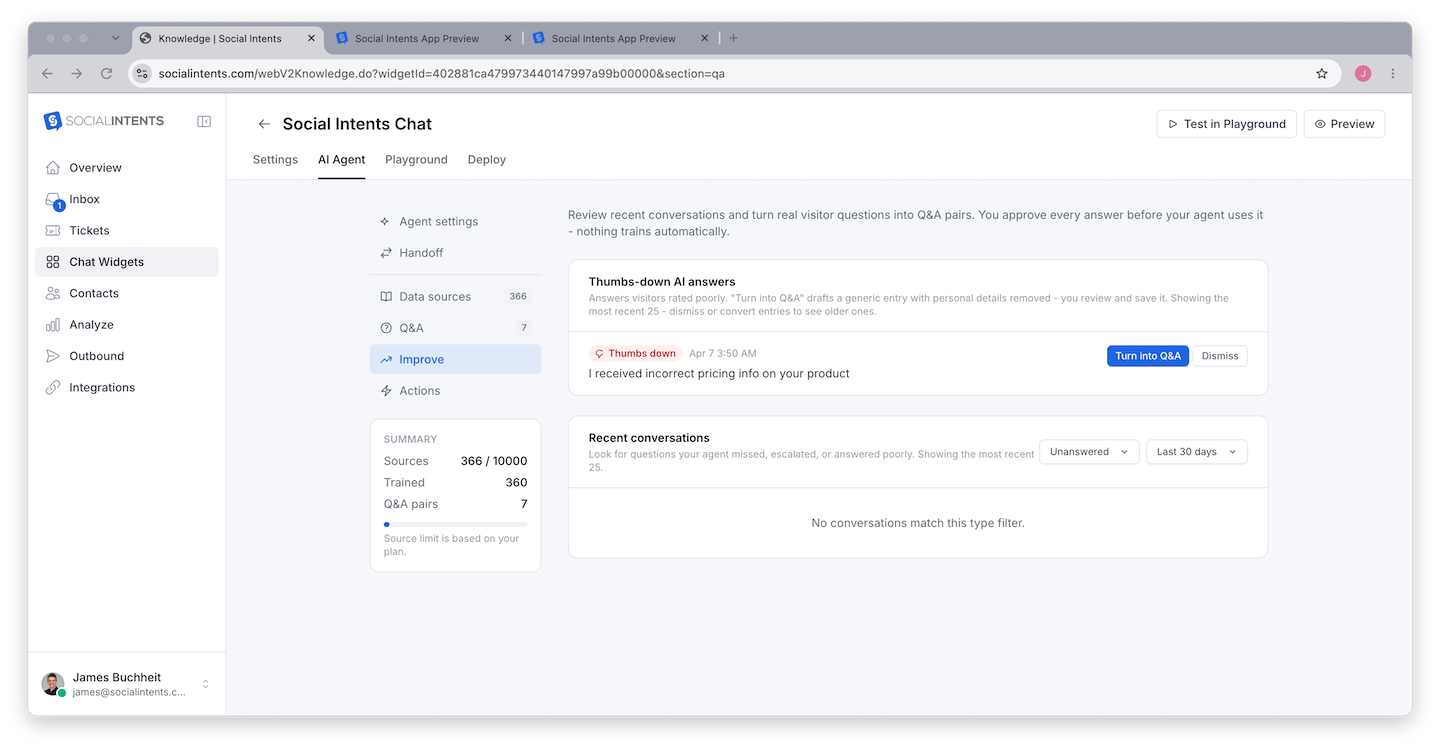
For each item you can:
- View exchange or View transcript - See the full context before you decide.
- Turn into Q&A (or Create Q&A on a conversation) - One click drafts a corrected, reusable question/answer pair. Edit the answer to be right, save, and the bot uses it from then on. You approve every answer; nothing trains automatically. This is the fastest path from "bad answer" to "fixed forever".
- Dismiss - Remove items that are not actionable (spam, off-topic tests). Dismissed conversations can be shown again and restored.
Mining Transcripts
Thumbs feedback only catches visitors who bothered to rate. Once a week, skim bot conversations in Analyze and look for three patterns:
- Repeated questions - The same question appearing daily deserves a dedicated Q&A pair, even if the bot's answer is passable.
- Silent failures - The bot answered confidently but wrongly, and the visitor left. These never show up in feedback; only transcript review finds them.
- Escalation clusters - Many handoffs on one topic mean the knowledge base is missing that topic entirely.
Choosing the Right Fix
| Root cause | Fix | Where |
|---|---|---|
| Fact missing from knowledge | Add the page or document, retrain | AI Agent > Data sources |
| Fact wrong or paraphrased loosely | Exact Q&A pair (takes priority) | AI Agent > Q&A |
| Right facts, wrong behavior/tone | Adjust instructions | Playground |
| Answers too long or erratic | Lower Max tokens / Temperature | Playground > Model & response style |
| Complex reasoning failures | Try a stronger model tier | AI Agent tab |
Metrics That Tell You It's Working
- Thumbs-down rate trending down week over week.
- Escalation rate stabilizing - not zero (handoffs are healthy), but no longer dominated by one missing topic.
- Repeat questions disappearing from transcripts after you add their Q&A pairs.
All three are visible across Analyze reports - see Feedback and Satisfaction Scores.
Frequently Asked Questions
How do visitors rate answers?
Thumbs up/down icons appear on bot answers in the chat widget when Also collect thumbs up / down on AI answers is turned on in the widget's Settings tab > Feedback form. Ratings flow to Improve automatically.
Who can see Improve?
Admins and Managers. Agents do not see it. Roles are managed under Settings > Team - see Understanding Roles.
How much time does this take?
Fifteen minutes weekly is enough for most teams: clear the Improve queue, skim a handful of transcripts, add two or three Q&A pairs. The compounding effect over a quarter is dramatic.