
Your chatbot is only as good as its knowledge. The Knowledge page - opened from Data sources in your widget's AI Agent tab (Chat Widgets > your widget > AI Agent) - is where you feed it websites, documents, and curated Q&A, and where you continuously improve it from real visitor feedback. This guide covers every source type and the practices that produce accurate answers. See how it fits into a ChatGPT chatbot trained on your content.
The Knowledge Page at a Glance
- Data sources - Website pages, sitemaps, and uploaded files the bot is trained on, with per-source status, retrain schedule, and delete. Your plan sets how many sources you can add.
- Q&A - Hand-written question/answer pairs that take priority for exact matters like pricing and policies.
- Improve - Visitor thumbs-down feedback turned into training fixes (Admin/Manager only). Covered in Improving Response Quality.
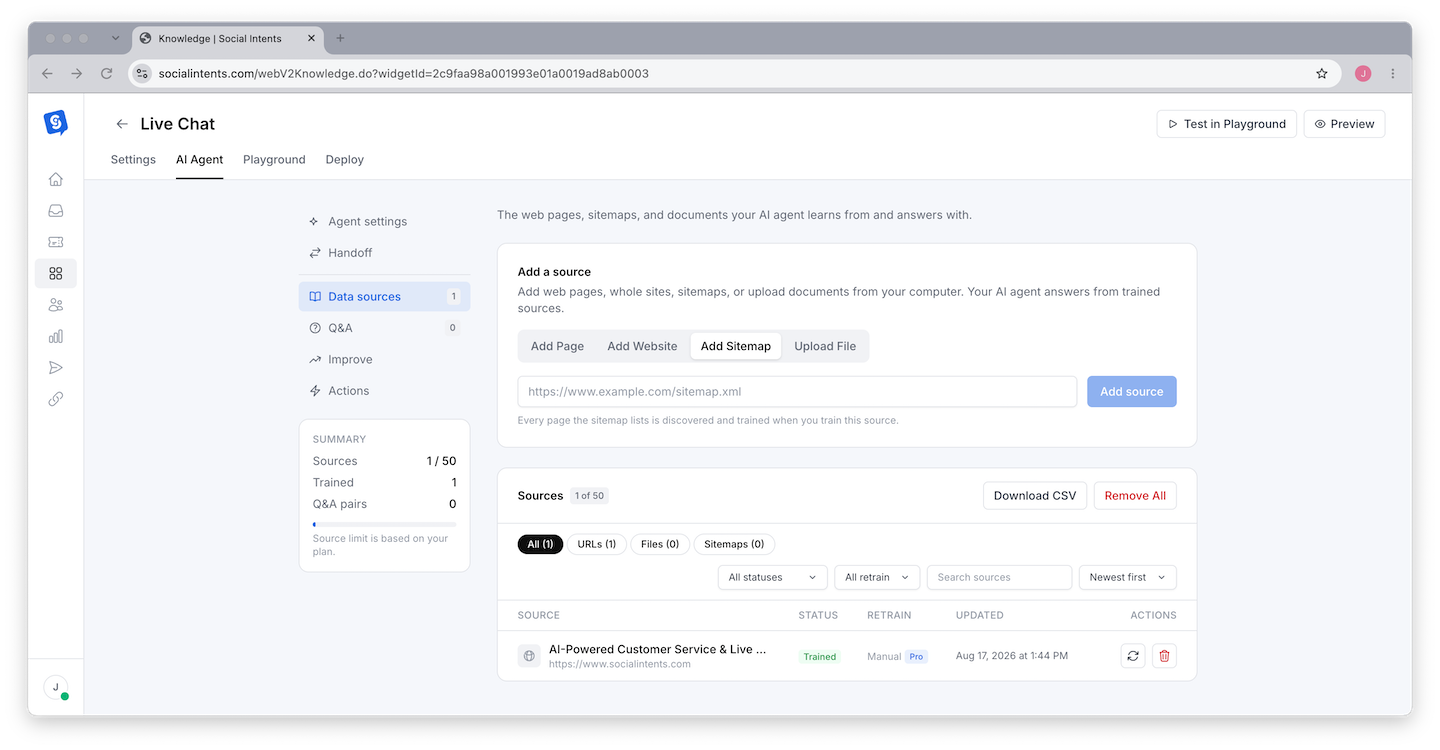
Adding Sources
Add Website (crawl)
Enter a starting URL and the crawler discovers and imports linked pages on the same site. Best for training on your whole site or a section like /help. Review the imported list afterward and delete pages that should not inform answers (careers, legal boilerplate, old blog posts).
Add Sitemap
Point at an XML sitemap (yoursite.com/sitemap.xml) to import exactly the URLs it lists. The most precise way to train on a large site - no crawler guesswork.
Add Page (single URL)
Import one specific page. Use it to top up training after publishing a new page without re-crawling everything.
Upload File
Drop in PDF, Word, text, HTML, or Excel files - product sheets, internal FAQs, policy docs that are not on your website. Documents train automatically after upload. Uploading a CSV of URLs (one per line) bulk-imports every URL listed, which is the fastest way to train on a curated page list; train those URLs from the table afterward.
Training and Maintaining
Train
Click Train All after adding web pages, sitemaps, or CSV URL lists. Each row shows its status (Trained, Needs training, or Errors); large imports process in the background.
Retrain After Changes
Training is a snapshot - the bot does not see website edits until you retrain that source (the Train button on its row, or Train All). On Pro plans and up, Check for Updates re-checks trained web pages and retrains only the ones whose content changed, and each web source can retrain automatically on a Weekly or Monthly schedule (Daily on Business). Otherwise, add "retrain the bot" to your content-publishing checklist.
Curate
Use Search sources, the status and retrain filters, and sorting to audit what's trained. Download CSV exports the full source list; Remove All clears it when you want to rebuild from scratch. To retire pages for good (for example discontinued products), use Remove URLs from a list: upload a CSV or Excel file, paste URLs, or link a Google Sheet. Listed URLs are removed from training and stay blocked, so later crawls and sitemap retrains do not add them back.
Using Q&A Pairs
Q&A pairs are exact answers you write yourself, and the bot strongly prefers them when a visitor's question matches. Use them for:
- Precision-critical answers - prices, refund windows, SLAs, compatibility - where paraphrasing from a web page risks drift.
- Questions your site never answers directly - "Do you offer discounts for nonprofits?"
- Corrections - when a transcript shows a wrong answer, a Q&A pair is the fastest permanent fix.
What Trains Well (and What Does Not)
| Trains well | Trains poorly |
|---|---|
| FAQ and help center pages | Pages that are mostly images or video |
| Product and pricing pages with real text | Content behind logins or paywalls |
| Policy pages (shipping, returns, privacy) | Heavily scripted single-page apps with no server-rendered text |
| Plain-text and document uploads | Spreadsheets of raw numbers with no context |
Frequently Asked Questions
How much content can I train on?
The number of sources you can add depends on your plan. Most teams need far less than they expect - 200 well-chosen pages beat 2,000 unfocused ones. See Chat Limits, Agent Limits & Usage.
Does the bot browse the live web when answering?
No. It answers from trained knowledge only, which is what keeps answers consistent and on-brand. That is also why retraining after content changes matters.
Can I train on a competitor's site or third-party docs?
Technically the crawler will import any public URL, but train only on content you have the right to use - and remember the bot will represent whatever you feed it as your answer.
Why does the bot miss content from a page I trained?
Most often the page renders its text with client-side JavaScript, so little text was imported. Check the page's "view source" for the actual copy; if missing, add the content as a file upload or Q&A instead.