
Inbound chat waits for customers to start. Outbound, in the left sidebar, lets you start the conversation: WhatsApp broadcasts to opted-in contacts, SMS and email campaigns triggered by events, and proactive chat messages for visitors on your website. One-to-one WhatsApp and SMS messages are sent from the Inbox.
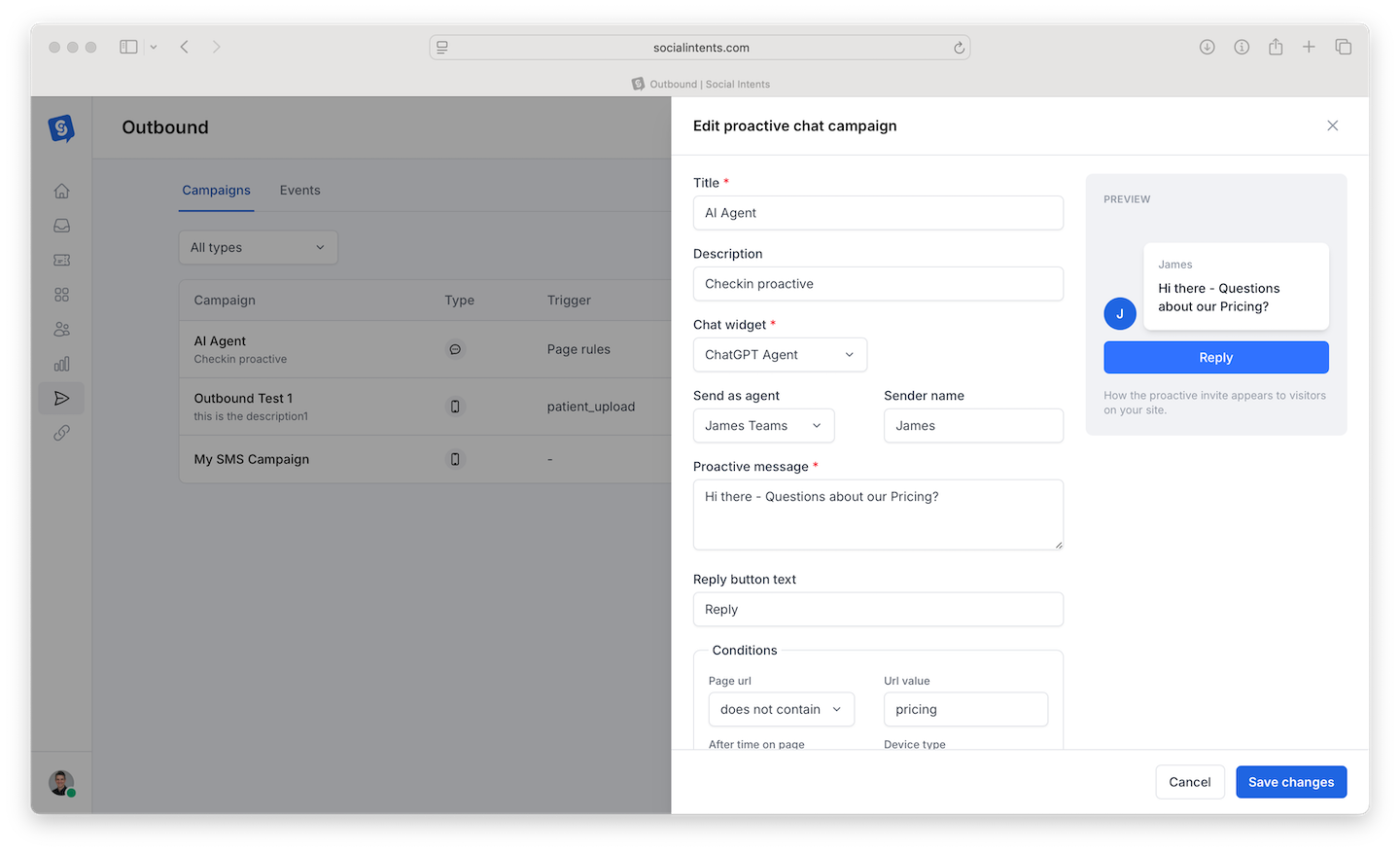
The Outbound Page
- Campaigns: every campaign and broadcast, filterable by type. Click New campaign to choose WhatsApp broadcast, WhatsApp sequence, Proactive chat message, SMS message or Email.
- Templates: your WhatsApp message templates and the template library. See WhatsApp Template Manager and Library.
- Events: event keys such as abandoned_cart that trigger SMS, email and proactive chat campaigns.
Which Tool to Use
| You want to | Use | Requires |
|---|---|---|
| Message many opted-in contacts on WhatsApp | WhatsApp broadcast: audience, approved template or free-form text, send window, reach check, report and retargeting. See WhatsApp Broadcasts. | Connected WhatsApp number and a Trial, Basic, Pro or Business plan |
| Message one customer on WhatsApp | Inbox > compose > WhatsApp message, with a template if their 24-hour window is closed. See WhatsApp in the Web Inbox. | Compose turned on in WhatsApp settings |
| Text one customer | Inbox > compose > SMS message, or Compose on the contact's page. | Twilio SMS with outbound SMS turned on |
| Text or email contacts when an event happens | SMS message or Email campaign with a trigger event | An event key and, for SMS, a Twilio number |
| Greet website visitors | Proactive chat message | Your installed chat widget |
WhatsApp Sequences
To send several messages to each person over hours or days, such as a welcome series or a follow-up after a chat, use a WhatsApp sequence. Each person's sequence stops as soon as they reply, an agent messages them or they opt out.
WhatsApp Broadcasts vs One-to-One WhatsApp
Before broadcasts, outbound WhatsApp meant sending an approved template to one person at a time from the Inbox. That still works and is the right tool for a single follow-up: the message continues the customer's latest chat, and their reply lands in the same thread.
For more than a handful of people, use a WhatsApp broadcast. Broadcasts check consent and opt-outs for every contact, skip people in an open conversation, respect a send window, pace sending, stay inside your plan and Meta limits, and give you a per-recipient report you can retarget from.
Event-Triggered SMS and Email Campaigns
Create an Event
On the Events tab, create an event key such as abandoned_cart and send it from your site or app.
Create the Campaign
Click New campaign and choose SMS message or Email. Set the Title, Trigger event, Audience segment, Delivery window start and end, Start date and the message. SMS campaigns also need a From number.
Handle Replies
Replies arrive in the Inbox and your team platform like any conversation. Plan coverage: 500 messages with a 10% reply rate is 50 conversations.
Proactive Chat That Doesn't Annoy
- Target narrowly. Pricing page visitors get a pricing question, not a generic "Hi!".
- Delay the trigger. Fire after 20 to 30 seconds on the page, not instantly.
- Have coverage. Pair it with your schedule or let the AI agent answer.
Compliance Basics
Message only people who opted in and honor opt-outs right away. WhatsApp broadcasts check consent automatically and treat STOP replies as opt-outs; see WhatsApp Consent and Opt-Outs. Respect WhatsApp's template rules and local quiet-hours rules for SMS. When in doubt, send less.
Frequently Asked Questions
Which plans include outbound?
WhatsApp broadcasts are available on Trial, Basic, Pro and Business. SMS needs a connected Twilio number. See Plans, Billing & Upgrades.
Can the AI agent handle replies?
Yes. Replies follow the same routing as inbound messages, so the widget's AI agent answers first and escalates as usual.
How do I measure results?
Each WhatsApp broadcast has its own report, and Analyze > WhatsApp campaigns compares them. See Broadcast Reports and Retargeting and Understanding Your Reports Dashboard.